


A Complete SEO Audit Checklist to Improve Search Rankings
,
February 21, 2026
Think your website should rank higher on search results, but it doesn’t? You’re not alone.
Many businesses invest in high-quality content and backlinks only to find their website underperforming.
The issue often isn’t a lack of effort. It’s the search optimization problems that usually go unnoticed.
That's where an SEO audit checklist becomes useful. It helps you find what’s holding your site back so you know what to fix and improve.
Below, we'll share a complete SEO audit checklist built for those who want higher search rankings, steady traffic growth, and better results from their website.
Book a strategy demo with ABHMedia and outrank your competitors on conversion-driving keywords!
TL;DR
- An SEO audit checklist covers technical SEO (crawlability, speed, security), on-page SEO (content, keywords, images), off-page SEO (backlinks), and local SEO when relevant.
- Fix technical issues first. Improve indexing, site speed, Core Web Vitals, mobile usability, and security (using HTTPS) to give search engines a clean foundation.
- To strengthen on-page and content signals, optimize title tags, headings, keyword targeting, and images.
- Audit and grow your backlink profile. Remove weak links, build high-quality backlinks, and target pages that drive conversions, not just traffic.
- If you don’t have the time or expertise, ABHMedia helps SaaS companies run full SEO audits and build revenue-driven SEO strategies that turn search traffic into demos, trials, and paid users.
17-Step SEO Audit Checklist to Use for Your Website
Use this SEO audit checklist to identify hidden errors, fix issues, and improve your website’s rankings.
1. Check Website Crawlability and Indexing
First, confirm that your website is accessible to search engines. There are two things you need to check: crawlability and indexing.
Website crawlability means search engines can read your pages. Indexing is how Google organizes and stores information about those pages.
If search engines cannot crawl or index your site, it won’t rank in the search results.
You can use a lot of free and paid tools to check website crawlability.
We recommend Google Search Console because it's free, reliable, and easy to navigate for beginners. Here's how to use it:
Add Property to Google Search Console
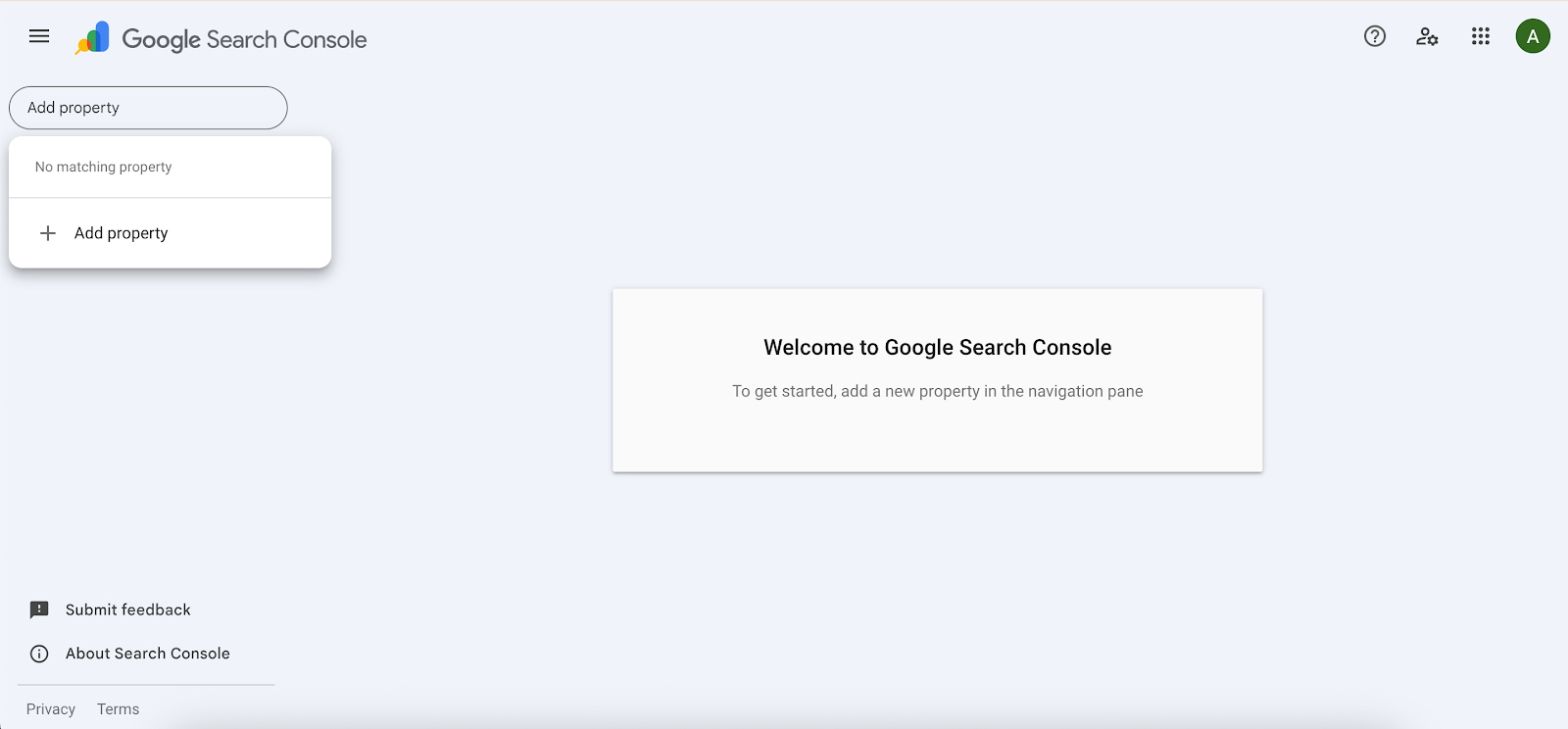
Open Google Search Console and add your website as a property, if you haven't yet. You can use a domain, a subdomain, or a URL prefix.
Analyze the Page Indexing Report
Access the page indexing report by clicking the Coverage option on the left sidebar.
After opening the report, the first thing you'll see is the summary page. The default view shows indexing errors on your website. But you can filter the report to show valid pages with warnings, valid pages (those without issues), and excluded pages.
Review important pages with indexing errors because they won't appear in search engine results, which will affect your website traffic.
There are several reasons behind these errors, including crawl issues, redirect errors, server errors, URL not found (404), or a "noindex" tag.
Valid pages with warnings are also worth looking into. These pages may or may not appear in Google search results depending on the issue. For example, a page may be indexed but blocked by a robots.txt file, which prevents Google from accessing it.
Use the URL Inspection Tool
Click on an error you found in the page indexing report. Scroll down and click on an example URL to further inspect the issue.
Use the URL inspection tool to show all the details available for a specific page with errors.
Then, test the live version of the URL to confirm whether Google's search bots can access your page for indexing.
Submit a Sitemap
The XML sitemap lists the pages you want indexed in search engines like Google.
Submitting a sitemap helps search engines crawl and index content more efficiently. That means your website can appear in the search results faster.
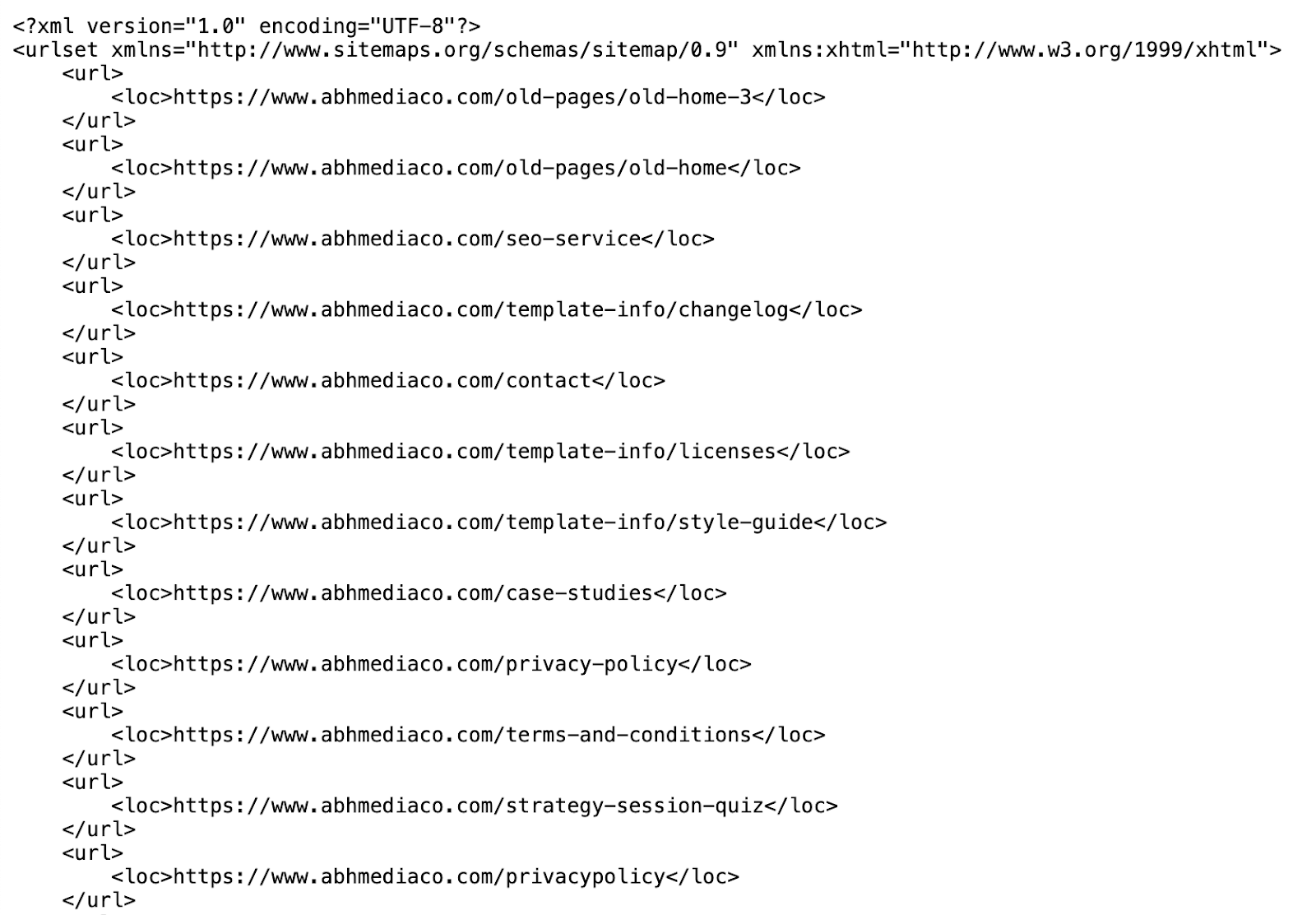
You don't have to submit a sitemap if you have a small website (500 pages or fewer) or use a web hosting service like Squarespace or Wix.
Alternatively, you can hire an SEO agency like ABHMedia, which will submit a sitemap on your behalf and implement effective strategies to boost your website's rankings.
Book a strategy call today to learn more.
2. Fix Technical SEO Errors
When evaluating your website's crawlability and indexing, you may find technical issues that prevent pages from appearing in the search engine results pages (SERPs).
One of the most common technical SEO issues is the 404 error or "Page Not Found." This error usually occurs due to broken links, typos, moved pages, or deleted content. To fix it, implement 301 redirects to guide crawlers and users to relevant live pages.
Duplicate content is another technical SEO error. Multiple versions of the same page confuse search engines. Use canonical tags to point Google or Bing to the master or "preferred" page version.
Many website owners also encounter a server error, which can be prevented by monitoring server performance regularly.
Accidental "noindex" tags make one or multiple pages invisible to search engines.
Remove these "noindex" tags from your important pages, such as blog posts. But you can keep them on admin login pages, search pages, duplicate or thin content, and expired content (e.g., old promotions or out-of-stock items).
3. Improve Site Speed
Site speed directly affects organic traffic because it's a confirmed SEO ranking factor for both desktop and mobile searches. If your website is slow, you'll appear less in the search engine results.
Slow loading times also increase bounce rates, which refer to the percentage of users who visit a single web page and leave without interacting.
In fact, Google's benchmark study reveals that 53% of mobile users leave a page if it takes more than three seconds to load. If that load time reaches seven seconds, the probability for a visitor to leave jumps to 113%.
It's important to improve site speed if you want to improve Google rankings and reduce bounce rates.
Start by running your site through Google's PageSpeed Insights or GTmetrix. These tools provide useful insights into why your website is slow.
If plugins and scripts affect page speed, remove unused or heavy ones. Stick to high-quality and well-coded plugins instead. Next, enable browser caching and use a content delivery network (CDN) to serve content faster across locations.
You can also minify or compress CSS and JavaScript files to reduce file size. This helps your pages load faster.
In some cases, slow loading times are your hosting provider's fault. Consider upgrading to a better server to improve site speed.
4. Enhance Core Web Vitals
Core Web Vitals are Google’s key metrics for measuring user experience. They focus on how fast your site loads, how quickly it responds, and how stable it looks.
Google uses Core Web Vitals as part of its ranking system, which means poor scores can hurt your visibility.
You should monitor and improve three important metrics:
- Largest Contentful Paint (LCP): This measures your website's loading performance. Google recommends keeping LCP under 2.5 seconds. To improve LCP, enable caching and remove render-blocking scripts.
- Interaction to Next Paint (INP): It looks at your site's responsiveness to user actions like clicks or taps (when users browse from their mobile devices). A good INP score is less than 200 milliseconds. You can achieve that by reducing heavy JavaScript and removing unused scripts.
- Cumulative Layout Shift (CLS): It tracks visual stability. If buttons or text shift suddenly, users get frustrated. Keep CLS low by setting image dimensions and avoiding late-loading ads or banners.
5. Make Sure Your Website Is Mobile-Friendly
Your mobile website is the main version Google considers for ranking.
If you don't optimize your site for mobile devices, your visibility in the search results can decrease.
People also expect a seamless mobile experience. If they find your site too difficult to use on their phones, they leave and never come back. This hurts traffic and revenue if you're selling a product or a service.
To make your site mobile-friendly, use a responsive design. Check if your site's layout automatically adjusts to different screen sizes. If not, switch to fluid grids and flexible images.
Make sure the text is readable without zooming. Buttons should also be large enough to tap easily. Keep menus short and clear and use collapsible navigation for smaller screens.
Avoid pop-ups that cover the entire page, especially on landing pages, because these can frustrate users.
Site speed is also important on mobile devices. Implement lazy loading, minimize JavaScript files, and reduce redirects to improve mobile page speed.
6. Strengthen Website Security
Google prioritizes websites with HTTPS because it secures user data.
HTTPS alone won’t push your website to the top of the SERPs. However, it supports stronger SEO performance in several ways, such as building user trust and enabling safer crawling and indexing.
To improve website security, you can adopt HTTPS and the following best practices:
- Set up 301 redirects from HTTP to HTTPS to redirect users to your secure website.
- Update all internal links to point to HTTPS URLs.
- Resubmit your XML sitemap in Google Search Console.
- Monitor crawl errors and index coverage after migration.
7. Rewrite Title Tags and Meta Descriptions
Title tags and meta descriptions are important pieces of information about your page that appear in search results. The title tag is the clickable headline, while the meta description is the short summary below it.
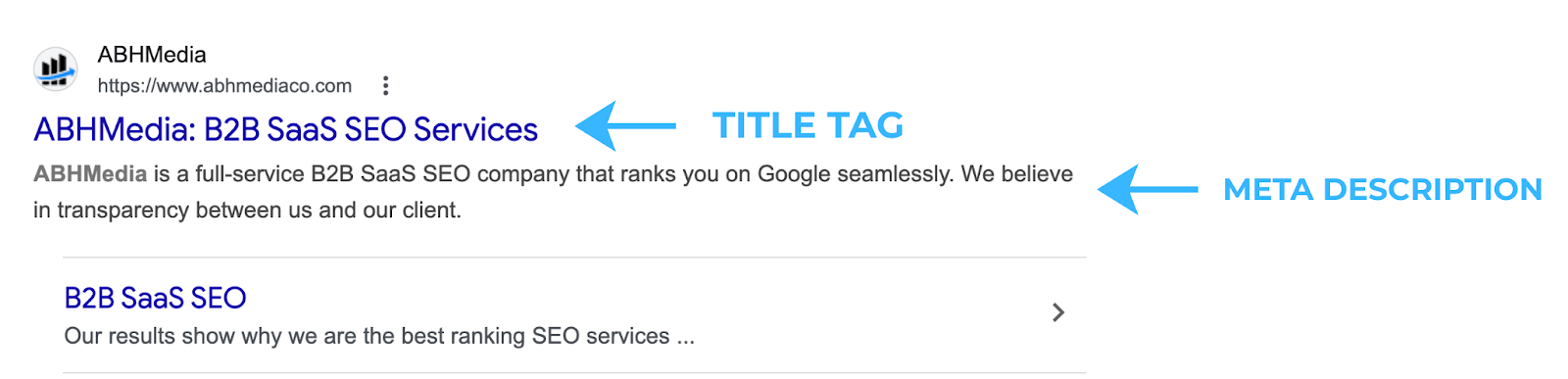
Title tags are a confirmed SEO ranking factor. Google uses them to understand page content. If your titles are missing, poorly written, or too long, your site's rankings can suffer.
Include the primary keyword when rewriting title tags. Keep the length of your page titles to around 55-60 characters.
Meta descriptions, on the other hand, are not an official SEO ranking factor. An Ahrefs study also revealed that Google rewrites meta descriptions 62.78% of the time.
Still, they are important because a well-written meta description can increase click-through rates. It gives users a clear reason to choose your page over others. More clicks often lead to better performance over time.
To write an effective meta description, briefly describe what your page is about using 130–160 characters.
8. Check Headings and Content Structure
Headings are important elements to check during on-page SEO audits. They tell search engines what your page is about and how your content is organized.
Clear content headings also improve readability. They help users find answers faster and stay longer on your site.
Use one H1 tag per page. The H1 represents your main title and should include your primary keyword when relevant. Multiple H1 tags can confuse search engines about the page’s focus.
Next, structure your content with H2 and H3 tags. H2s break the page into main sections. H3s support those sections with more detail. This hierarchy enables search engines and users to understand topic flow and context.
9. Evaluate Keyword Targeting
Keyword research is the foundation of a strong SEO performance. If you target the wrong terms, rankings won’t bring qualified traffic.
First, review your target keywords. Do they match what your ideal customer is actually typing in search engines? Focus on search intent, not just volume.
Many businesses make the mistake of selecting short-tail keywords with high search volume. These search terms look attractive but are highly competitive and often vague. Ranking for them doesn’t always bring users ready to take action.
Long-tail keywords often perform better. According to Backlinko, 91.8% of all search queries are long-tails.
These phrases are more specific and usually show stronger intent. Many of them also have lower keyword difficulty, which means they're easier to rank for.
For example, a B2B SaaS company targeting the short-tail keyword "CRM software" may face strong competition. In contrast, ranking for "CRM software for small law firms" is easier. This long-tail keyword also attracts your target audience, which means better chances of converting them.
10. Improve Content Quality and Depth
Thin content rarely ranks well. Search engines and users lose confidence in your brand if they see your pages lack detail, clarity, or proof.
Use the E-E-A-T framework to improve content quality and depth. This stands for Experience, Expertise, Authoritativeness, and Trustworthiness.
You can show experience by sharing real examples, results, or use cases. If you’ve solved a problem before, explain how. Practical insight makes your content stronger.
Next, demonstrate expertise through direct answers. Cover related subtopics, not just the main idea. Insert relevant keywords naturally throughout the content to reinforce topical focus without sounding unnatural.
Build authority by referencing credible studies or industry sources. Support claims with data when possible to add weight to your content.
You should also go beyond surface-level blog posts. Develop white papers, write comprehensive guides, or conduct your own research.
Lastly, keep information accurate and current to strengthen trust. Update old statistics, fix broken pages, and link to recent statistics.
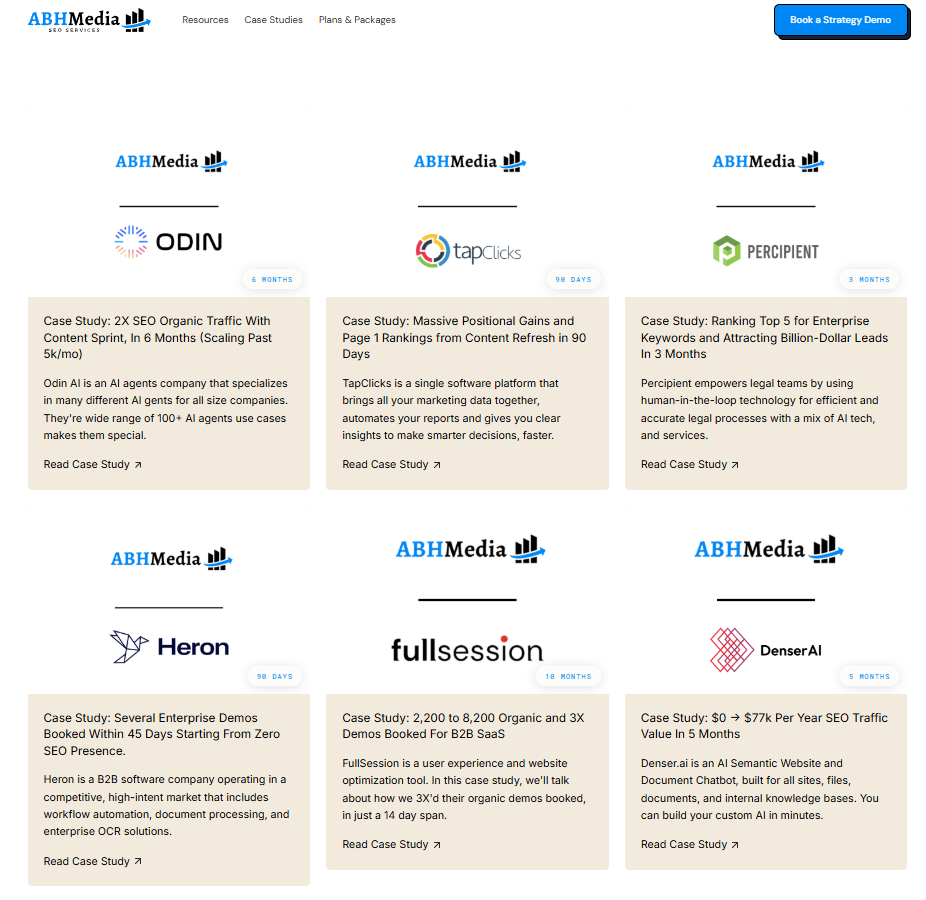
For B2B SaaS companies, consultants, and marketers, you can also build trust by writing case studies that show successful outcomes.
11. Optimize Images
Images improve user engagement, but large or unoptimized files can slow your website and affect rankings.
You should optimize images to support both SEO and user experience.
There are several ways to do this.
You can compress large images to improve loading speed. Use tools like TinyPNG or built-in compression features from your content management system (CMS).
Resize images to match the space they occupy. Don’t upload a 3000px image if it displays at 800px. This reduces unnecessary file weight.
Add a clear, descriptive alt text. Alt text helps search engines understand the image and improves accessibility. Only include relevant keywords when they fit naturally.
You should also use proper file names. Instead of “IMG1234.jpg,” use something descriptive like “seo-audit-checklist-example.jpg.”
Enable lazy loading so images load only when users scroll down. Doing so improves initial page speed.
12. Strengthen Internal Linking
Internal links connect pages within your website. They help search engines understand your site structure and pass authority from one page to another.
Strong internal linking supports better indexing and boosts rankings.
To improve your internal linking strategy, you should first understand your current internal links. Use tools like Google Search Console or Screaming Frog to see which pages lack internal links. Often, key pages are buried and don’t receive enough link support.
Next, identify pages with high traffic or high authority using Google Analytics or Semrush. Include a link from them to pages that need more visibility.
You should also interlink relevant pages. For example, develop a pillar page for a broad topic and point it to a cluster of supporting content, which tackles a more specific subject.
Don't forget to use descriptive anchor text to improve relevance and help search engines understand context.
Let's say you're a SaaS agency that wants to link to pricing and packages. Instead of "click here," you can write "check out our pricing plans."
13. Audit Your Backlink Profile
Backlinks are the links from other websites pointing to your site. They are one of Google’s strongest ranking signals.
When authoritative websites link to you, search engines see your content as more credible and rank your site higher. However, low-quality or spammy backlinks can weaken your authority and affect website rankings.
A proper off-page SEO website audit starts with a step-by-step review of your backlink profile:
- Collect backlink data: Use tools like Ahrefs, Semrush, or Google Search Console to list all links pointing to your site.
- Review link quality: Look at referring domains and their authority. A few high-quality, relevant links are more important than hundreds of low-quality backlinks from generic websites.
- Check anchor text: Make sure it looks natural and not overly optimized with exact-match keywords.
- Identify toxic links: Low-quality, spammy links can harm rankings. Remove them using the disavow tool within Google Search Console.
14. Identify New Backlink Opportunities
Once you clean up weak or toxic backlinks, the next focus is building stronger ones.
Take advantage of existing relationships. Contact high-quality websites that have linked to you before. Reach out when you publish updated research, new data, or improved guides. These contacts are easier to convert because they already trust your content.
Guest posting is another reliable method of getting backlinks. Contribute useful articles to respected publications and blogs in your industry. Focus on quality and relevance.
You can also monitor brand mentions using tools like Google Alerts. If a site mentions your company without linking, ask for a backlink.
You can even "steal" backlinks from competitors. Use SEO tools to see which sites link to competing pages. If their content is outdated or lacks depth, create a better version. Then, contact those same websites and explain why your page offers more value.
15. Improve Local SEO (If Applicable)
Local SEO focuses on improving visibility in location-based searches. It is important for local businesses that serve specific areas, such as law firms, restaurants, clinics, or retail stores. If customers visit your physical location, local SEO can drive real traffic.
However, not every business needs it. A SaaS company serving a global audience may not rely on local search results. In that case, you can skip this step.
A local SEO audit checklist involves two simple elements.
The first thing to check is your Google Business Profile. Make sure it is claimed and fully optimized. Check that your business name, address, phone number, and categories are correct. Add photos and keep hours updated.
Next, review major directory listings like Yelp and Yellow Pages. Keep your name, address, and phone (NAP) information consistent across all platforms. Inconsistent details may confuse potential customers.
16. Add Schema Markup (Structured Data)
Schema markup is a type of structured data you add to your website’s code. It helps search engines understand your content more clearly.
Although it’s not a direct ranking factor, it can improve how your pages appear in search results through rich snippets.
Rich results may include star ratings, frequently asked questions (FAQs), product prices, or event details. These enhanced listings can increase click-through rates (CTRs).
To add schema markup, you must first identify the right schema type for your page. Common types include Article, Product, FAQ, Local Business, and Organization.
Use Google’s Structured Data Markup Helper or generate JSON-LD code using trusted schema tools if you have technical SEO knowledge. Add the code to your page’s HTML, usually in the head section.
After adding it, test your markup using Google’s Rich Results Test. Fix any errors and track performance in Google Search Console.
17. Monitor SEO Analytics and Track Improvements
An SEO audit means little if you don’t track results.
After working through your SEO site audit checklist, you should closely monitor traffic, rankings, conversions, and overall site performance.
Use Google Analytics to analyze organic traffic trends, bounce rate, and conversion data. If traffic drops suddenly, investigate which pages are affected.
Create a simple monthly report to compare results before and after implementing fixes. This helps you see what works and where to adjust.
The Importance of SEO Audits for Website Owners
A thorough SEO audit shows what’s working, what’s broken, and what’s holding your rankings back. Here are the reasons why it's important:
Catch Hidden Technical Issues
Small technical errors often go unnoticed for months. Over time, they reduce online visibility and website traffic.
A technical SEO audit helps you uncover these issues early.
It reveals whether your site has crawl errors, broken links, redirect chains, slow-loading pages, or duplicate listings. These issues confuse search engines and weaken rankings.
Make sure to address these technical problems right away to help search engines crawl and rank your site.
Provide a Better User Experience
SEO is not just about search engines. It’s also about people who visit your website. If users struggle to navigate your site, they leave.
A technical SEO audit reviews page speed, mobile usability, navigation, and content structure. It tells you when pages are slow or when layouts confuse website visitors, so you can fix them.
When users can find information quickly, they stay longer. They explore more pages and convert at higher rates.
Boost Search Engine Rankings
Higher rankings don’t happen by accident. They come from fixing gaps and strengthening weak areas in your website.
Regular SEO audits help you review keyword targeting, backlinks, and missing on-page elements like headers, images, internal, and external links.
These audits can also reveal duplicate content that splits ranking, keyword cannibalization, and thin pages.
By correcting these issues, you strengthen your authority and clarity. Search engines see your site as a trusted source and can better understand your content, which improves rankings.
Get More Value From Your SEO Efforts
SEO requires valuable time and resources. Without clear direction, you won't get maximum results from your efforts.
An audit shows which changes will have the biggest impact. You may find that improving internal links boosts key pages, or that refreshing old content brings back lost traffic.
When you review your entire site, you see where traffic converts and where it drops off.
This helps you invest in SEO efforts wisely. You stop spending time on pages that don’t matter and improve the ones that do.
Better focus leads to stronger returns from organic traffic.
Let a Professional SEO Agency Handle SEO Audits
Running a thorough SEO audit takes time, tools, and technical knowledge. Most businesses don’t have a dedicated SEO team reviewing crawl data, backlinks, and on-page issues every month. As a result, problems go unnoticed, and traffic growth slows.
Instead of trying to manage everything internally, working with a specialized SEO agency like ABHMedia gives you clear direction and measurable results.
ABHMedia works exclusively with SaaS companies. We run a comprehensive SEO audit to uncover content gaps, crawl issues, weak internal links, and missed keyword opportunities. Then, we build a tailored SEO strategy aligned with your product, funnel, and revenue goals.
Unlike other SEO agencies, we don’t chase vanity metrics. We target qualified traffic and build backlinks to specific pages you're trying to rank using strategic anchor text. We focus on low-hanging fruit keywords that drive demos, trials, and paid users for your SaaS business.
Book a free strategy call to get started!
FAQs About SEO Audit Checklist
What is an SEO audit?
An SEO audit is a full review of your website’s search performance. It checks technical SEO, content quality, keyword targeting, backlinks, and user experience. The goal is to find issues that prevent your pages from ranking higher on Google.
A thorough SEO audit also highlights missed opportunities for growth. Instead of guessing what’s wrong, you use data to see what needs fixing and what can improve traffic and conversions.
Why do you need a checklist for SEO audits?
An SEO audit involves a lot of tasks and elements. Without a checklist, it’s easy to miss key areas like on-page elements, page speed, and site structure.
A dedicated SEO audit checklist keeps the process organized and consistent. It ensures you review every major SEO ranking factor step by step. This saves time and prevents guesswork.
Should you use an SEO audit tool?
Yes, tools can speed up the entire SEO audit process. Platforms like Google Search Console, Screaming Frog, and Semrush help you find SEO issues quickly.
However, SEO audit tools only show data. You still need a strategy and a checklist to decide what to fix first.
How often should you conduct SEO audits?
You should review your SEO performance regularly. Many businesses run a light SEO audit every month and a deeper audit every quarter. If you redesign your website or see a traffic drop, audit immediately. These regular SEO audits help you address problems early and maintain steady organic traffic growth.




.png)
.png)