


SEO KPIs You Should Track to Measure Organic Search Growth
,
March 20, 2026
SEO key performance indicators (KPIs) measure the effectiveness of search engine optimization efforts.
Tracking SEO KPIs reveals which efforts drive results and which need improvement, so you can make data-driven decisions.
These SEO metrics also help you prove return on investment (ROI) to leadership and stakeholders.
Below, we'll discuss 14 SEO KPIs you should measure. We'll also share tips for tracking and improving each KPI on this list.
TL;DR
These are 14 SEO KPIs to track and measure:
- Organic visibility
- Organic traffic
- Keyword rankings
- Organic lead conversions
- Organic sales conversions
- Domain authority
- Click-through rate
- Bounce rate
- Average engagement time
- Customer lifetime value
- Cost per acquisition
- Return on investment
- Branded vs. non-branded traffic
- Google Business Profile metric
Top 14 SEO KPIs to Track and Measure
Here are the most important SEO KPIs you should track.
1. Organic Visibility
Organic visibility refers to how often your website appears in the search engine result page (SERP), including featured snippets and the "People Also Ask" SERP feature in Google.
This SEO KPI is also called search visibility or search impression.
You gain an impression every time your site shows up for a search query, even if no one clicks.
Organic visibility represents your total potential reach in search engines. If impressions grow, your content is appearing more frequently in the SERPs.
Impressions often improve before clicks or website rankings increase, making them an early sign of SEO progress.
How to Track Organic Visibility
You can track organic visibility using Google Search Console.
In the left-hand menu, find the "Performance" tab and click "Search Results."
Check "Total impressions" to learn how often your pages appear in search results.
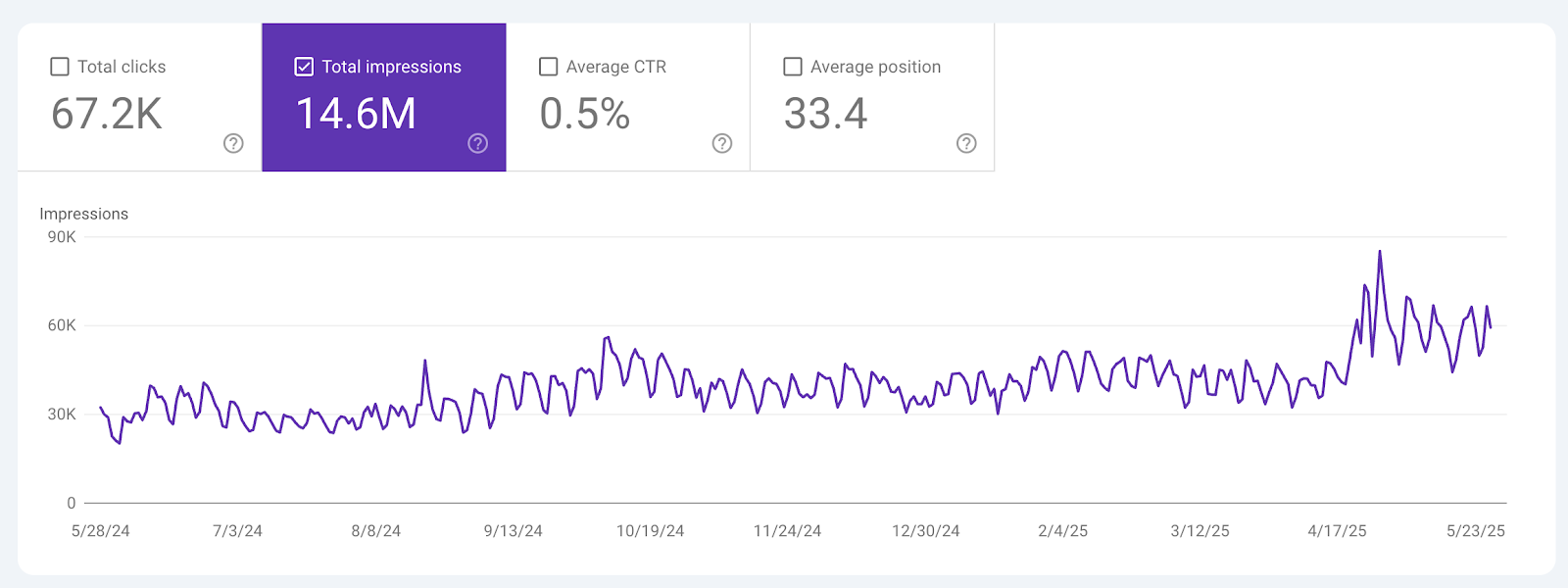
You can filter search impressions by page, query, country, and device. This helps you see which web pages gain visibility and which ones lose it.
Review trends over time instead of looking at one week of data.
Important: Google Search Console tracks your impressions for all keywords. Use other analytics tools if you want to measure organic visibility for specific keywords.
How to Improve Organic Visibility
Here are some ways you can boost your website's visibility.
- Publish content that targets relevant keywords and search queries.
- Optimize title tags and meta descriptions with primary keywords.
- Update existing content with additional subtopics, new sections, or deeper insights.
- Format content with lists, tables, short paragraphs, and structured data to target featured snippets or the "People Also Ask" SERP feature.
2. Organic Traffic
Organic traffic shows how many visitors come to your website from unpaid search results. It includes users who click on your pages from Google, Bing, and other search engines.
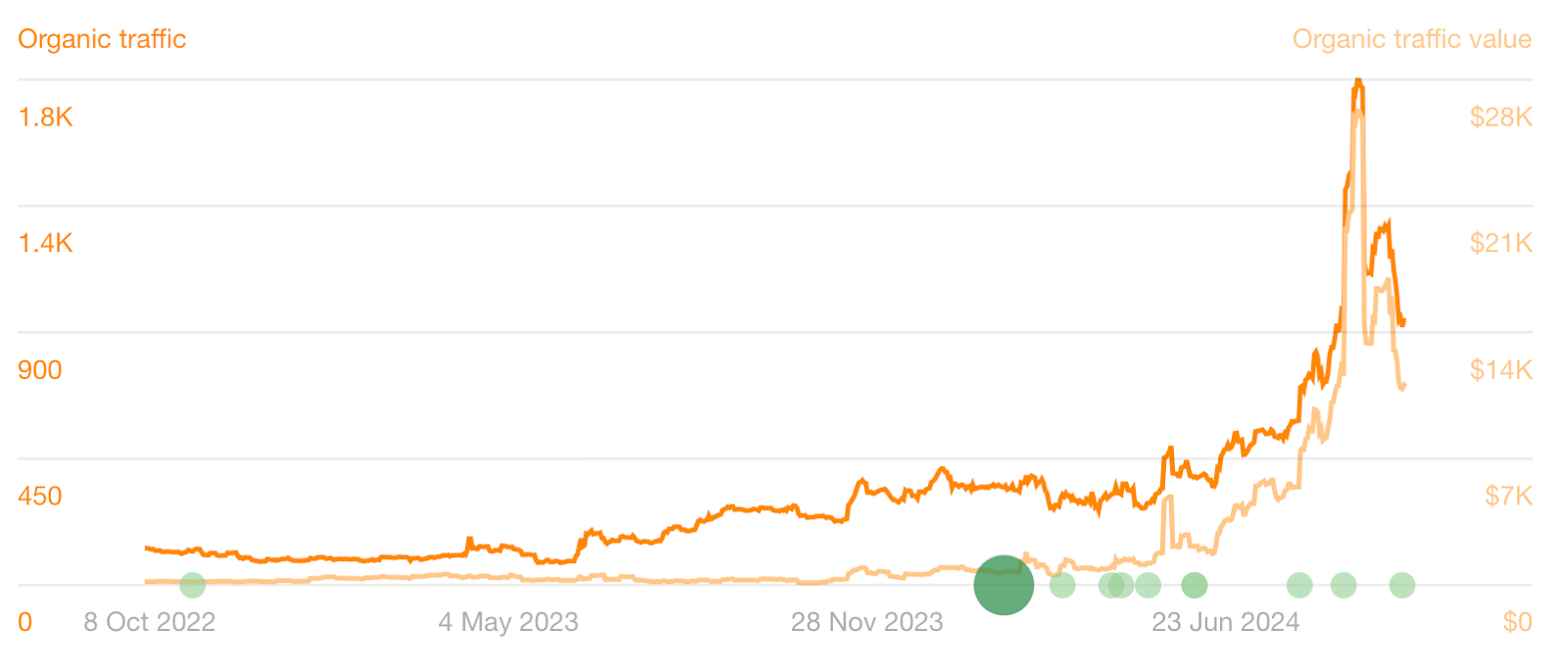
Tracking organic search traffic helps you understand if your SEO strategy is attracting the right audience.
Higher website traffic increases the chances of generating leads, sales, and revenue.
However, you should also look at the quality of that traffic, not just volume. If visitors leave quickly or never convert, high traffic numbers will not grow your business.
How to Track Organic Traffic
You can track organic search traffic in Google Search Console.
Navigate to the "Performance" tab and click "Search results."
Select "Total clicks" to see how many people visited your site from organic search results.
Scroll down to view which search queries drive the most traffic. You can also see which pages receive the most clicks.
You can filter by date to compare month-over-month or year-over-year growth.
How to Improve Organic Traffic
Below are useful tips to improve organic search traffic.
- Write content that answers the search intent.
- Optimize older blog posts to improve positions in the SERPs.
- Strengthen internal links to key landing pages.
- Build topic clusters around related keywords by creating pillar pages and supporting posts.
3. Keyword Rankings
Keyword rankings show where your website appears in search results for targeted keywords.
Ranking on the first page of the search results is important because almost 97% of desktop clicks in the U.S. happen within the top 10 results.
If you are not on page one, most users will not see your site.
Your website traffic drops. And you lose search impressions.
How to Track Keyword Rankings
You can track keyword rankings in Google Search Console.
Go to the "Performance" tab and review the "Average position" column. This shows where your pages appear in search results for different queries.
For more detailed tracking, use an SEO tool like Semrush. Open the Position Tracking tool and enter your domain.
Next, click “Set up tracking.” Choose the search engine, device, location, and language you want to track.
Then, type your target keywords in the empty box. Once you're done, select “Add keywords to campaign."
Finally, click "Start tracking" to view search rankings for multiple keywords in one dashboard. You can also track changes over time and estimate traffic from those rankings.
How to Improve Keyword Rankings
Here are expert tips to improve keyword rankings:
- Create high-quality content around keywords with low to medium competition that are relevant to your industry or target audience.
- Insert relevant and related keywords throughout the content, but place them naturally.
- Improve on-page SEO elements, such as titles, meta descriptions, headers, and images.
- Earn high-quality backlinks from authoritative websites.
4. Organic Lead Conversions
Organic lead conversions monitor how many visitors from organic search take a meaningful action on your website. These actions may include subscribing to a newsletter, filling out a contact form, downloading a guide, or requesting a quote.
In SaaS SEO, organic lead conversions refer to demo requests and free trial sign-ups. These actions show buying intent.
Lead conversions are important because organic traffic alone does not grow your business. You need users to take action.
Tracking your lead conversion rate shows whether your website attracts the right audience who are likely to become paying customers.
If organic visitors convert at a healthy rate, it means your SEO strategy brings in qualified prospects, not just clicks.
How to Track Organic Lead Conversions
You can monitor organic lead conversions in Google Analytics 4.
Set up conversion events. Go to the "Admin" page and click "Events" under Data display.
In the “Key events” tab, select the event that tracks an important action by clicking the star icon beside the event name.
Events could be form submissions, demo requests, trial sign-ups, or content downloads.
How to Improve Organic Lead Conversions
Follow these tips to increase organic search leads:
- Focus on long-tail, high-intent keywords (e.g., best onboarding software for enterprises) to attract users ready to convert.
- Add compelling calls to action throughout your content to encourage website visitors to take action.
- Use lead magnets, such as free checklists, downloadable templates, comprehensive reports, and ROI calculators.
- Remove unnecessary form fields to make sign-ups easier.
5. Organic Sales Conversions
Organic sales conversions measure how many visitors from organic search results become paying customers.
This metric tracks the percentage of organic leads who complete a purchase. It connects your SEO efforts directly to revenue.
Sales conversion rate is one of the most important SEO KPIs because it reflects actual business impact. Traffic and leads are nice-to-haves, but it's revenue that keeps your company running.
A high sales conversion rate shows that your organic SEO marketing efforts attract qualified prospects who are ready to buy.
Tracking organic sales conversions helps you measure SEO success against your business goals. If conversions increase, your SEO strategy is driving profitable growth. If they drop, you may need to adjust keyword targeting, content messaging, or the sales process.
How to Track Organic Sales Conversions
To calculate organic sales conversions, you should divide the number of customers by the total number of converted leads from your website. Then, multiply by 100 to get the percentage.
Let's say your B2B SaaS startup receives 30 demos through your website's contact form. However, only 12 businesses that booked those demos eventually became paid users of your SaaS product.
Divide 12 (sales conversions) by 30 (lead conversions), and multiply by 100. Your organic sales conversion rate is 40%.
If you want to track this properly, combine website data with your sales data. Use Google Analytics 4 to see which purchases came from organic search results.
Then, use a customer relationship management (CRM) system to monitor leads through each stage of the sales process. Doing so helps you understand how many organic leads close and how much revenue your SEO efforts generate.
How to Improve Organic Sales Conversions
Here are some ways to boost organic sales:
- Optimize product or solution pages with rich images, videos, and detailed descriptions.
- Create landing pages with clear offers and pricing details.
- Highlight customer reviews, testimonials, and case studies to build credibility.
- Develop content around buyer intent-focused keywords and explain why your product, service, or technology is the best choice.
6. Domain Authority
Domain authority shows your website's overall influence and its ability to rank in search results.
The score ranges from 1 to 100. Higher scores mean your site has a better chance of ranking well.
Domain authority largely depends on backlinks, which are links from other sites that point to your page.
Strong backlinks from authoritative websites (e.g., government, academic, or news) signal that your content is valuable, relevant, and trustworthy.
How to Track Domain Authority
One of the easiest ways to check your domain authority is by using SEO tools like Moz, Ahrefs, or Semrush.
Each tool provides its own score. Moz shows domain authority, Ahrefs calls it domain rating, and Semrush uses authority score.
While the names may differ slightly, they all estimate how search engines may view your site’s overall credibility.
To understand what impacts your authority score, review your backlink profile. Use Ahrefs, Semrush, or Google Search Console to see how many referring domains link to your site. Look at link quality, spam signals, and anchor text.
How to Improve Domain Authority
Consider the tips below to strengthen your site's authority.
- Earn backlinks from trusted and relevant websites.
- Remove or disavow spammy backlinks.
- Publish valuable content to support your link-building strategies.
- Build relationships with other websites or publications in your industry for guest blog opportunities.
7. Click-Through Rate (CTR)
Click-through rate is the percentage of users who click on your website after seeing it in the SERPs. It compares the number of website clicks to the number of search impressions.
For example, if 100 people see your page and 5 individuals click, your CTR is 5%.
CTR shows how well your titles and meta descriptions attract users. If they find your page intriguing enough, they click your page to learn more.
A higher CTR brings more website traffic and increases your chances of generating leads or sales. In SEO, anything above a 3% CTR is considered good.
The top organic result on Google (position 1 in the SERPs) has an average click-through rate of 27.6%.
How to Track CTR
You can track the click-through rate in Google Search Console.
Go to "Performance" in the left-hand menu.
Then, click on "Search results." You will see a table with total clicks, total impressions, and average CTR.
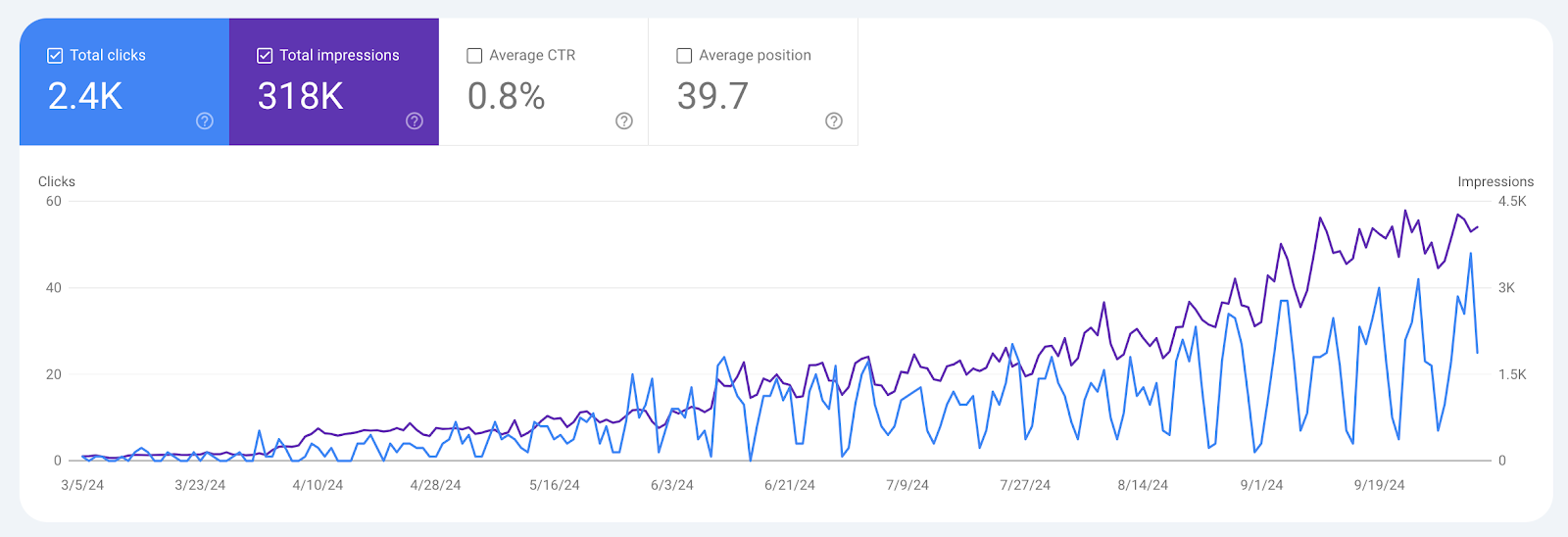
Scroll down to review the click-through rate by keyword or by page. This helps you identify pages with high impressions but low clicks. Those are strong opportunities for improvement.
How to Improve CTR
Here's what you can do to improve click-through rates.
- Write clear and compelling title tags.
- Add numbers or benefits in headlines when relevant.
- Match titles closely to search intent.
- Improve meta descriptions with strong calls to action.
8. Bounce Rate
Bounce rate measures the percentage of users leaving your website after viewing only one page. They do not click on another page or take any further action.
While bounce rate is not a direct ranking factor, it's important to keep it low.
That's because a high bounce rate can signal that your content does not match user intent. It may also point to slow loading times, poor site design, or unclear messaging.
Lowering your bounce rate can improve user engagement and increase your chances of conversion.
How to Track Bounce Rate
You can check the bounce rate in Google Analytics 4.
Open "Reports," click "Engagement," and select "Pages and screens."
In the top right corner, click the pen icon to customize the report.
Next, go to "Metrics" and add “Bounce rate.”
Click "Apply" to see the bounce rate for each page on your site. This data helps you identify underperforming pages, assess content quality, and reveal technical issues.
How to Improve Bounce Rate
Consider these tips to improve bounce rates:
- Optimize Core Web Vitals (loading speed, interactivity, and visual stability).
- Use a responsive and mobile-friendly web design.
- Include headings, bullet points, and images to make content easy to read.
- Add internal links to guide users to related pages.
9. Average Engagement Time
Average engagement time, or session duration, reveals how long visitors actively spend on your website or a specific page. It tracks the time users stay engaged before leaving.
This SEO KPI shows how interesting and relevant your content is. If visitors stay longer, it usually means they are reading, watching, or interacting with your page. But if they leave quickly, your content may not meet their expectations.
Tracking average engagement time helps you judge content quality. Higher engagement often leads to stronger trust and better conversion rates.
How to Track Average Engagement Time
You can track user engagement in Google Analytics 4.
Go to "Reports" and click "Engagement."
Then, select "Overview."
At the top of the report, you will see “Average engagement time” displayed above the graph.
How to Improve Average Engagement Time
Below are some ways to improve the average engagement time:
- Write helpful content that answers user questions.
- Break up walls of text into short paragraphs.
- Add animations, videos, and interactive elements (e.g., calculators, polls, or quizzes) to your website.
- Guide users to related content with internal links.
10. Customer Lifetime Value (CLV)
Customer lifetime value estimates how much revenue a customer brings to your business over the course of your relationship.
A customer who makes repeat purchases or renews a SaaS subscription increases your business's total revenue over time.
This SEO KPI helps you understand the long-term impact of your SEO campaigns. It also shows whether your search optimization efforts lead to profitable customers, not just one-time buyers.
How to Track CLV
To calculate customer lifetime value, you need three key data points.
First, find your average purchase value. This is the median amount a customer spends per transaction.
Next, calculate purchase frequency, which tells you how often a customer buys from you in a given period.
Finally, measure customer lifespan. This is how long a customer continues to buy from your business.
Once you have all of that data, use this formula:
CLV = Average Purchase Value × Purchase Frequency × Customer Lifespan
For example, in B2B SaaS, a customer pays $500 per month. They stay subscribed for 24 months.
- CLV = $500 × 12 months × 2 years (or simply $500 × 24 months)
- CLV = $12,000
This means a single paid user is worth $12,000 in lifetime customer value.
How to Improve CLV
Here are useful tips to increase the customer lifetime value.
- Write post-purchase content, such as "how-to" guides and step-by-step tutorials.
- Update existing top-performing pages with customer success stories.
- Publish a detailed product roadmap page to build trust and show long-term value.
- For SaaS SEO, create onboarding and technical content that supports client retention and reduces churn.
11. Cost Per Acquisition (CPA)
Cost per acquisition computes how much you spend to acquire one paying customer.
In SEO, this may include in-house staff salaries, SEO tools, content creation, and link-building costs. It shows the real costs behind each conversion from organic search results.
Tracking CPA with customer lifetime value helps you understand whether your SEO investment makes sense.
Website traffic and rankings look good on reports, but both CPA and CLV tell you if those results are profitable.
A low CPA compared to your CLV indicates a cost-effective SEO strategy. Meanwhile, a high CPA might mean poor content marketing strategies or keyword targeting.
How to Track CPA
To calculate CPA for SEO, you should track both costs and conversions.
Start by adding up all SEO-related expenses. These typically include SEO agency fees, SEO tool subscriptions, technical fixes, and link-building costs.
Next, track how many sales conversions came from organic search. Use Google Analytics 4 to identify these conversions. You may also connect your CRM to confirm closed deals.
Then, use this formula:
CPA = Total SEO costs / Total number of conversions
For example, if you spent $5,000 on SEO every month and generated 100 customers, your CPA is $50.
How to Improve CPA
Follow the tips below to improve CPA.
- Target long-tail and high-intent keywords, such as "best mobile inspection software for nursing homes."
- Analyze pages that convert a lot of users and scale what works.
- Optimize for branded search terms to capture ready-to-buy users.
- Improve page speed and mobile experience to prevent lost conversions.
12. Return on Investment
Return on investment measures how much revenue you earn compared to how much you spend.
ROI connects SEO results (e.g., better search engine rankings, increased traffic, or higher user engagement) directly to profit.
A positive ROI means your SEO strategy pays off. A negative ROI means you need to adjust spending or improve conversions.
Tracking ROI helps you justify budgets and show value to leadership. It also helps you decide where to invest more and where to cut back.
How to Track SEO ROI
To calculate ROI from SEO, you need two numbers: revenue and cost.
First, measure how much revenue comes from organic search. Use data from Google Analytics 4 and your CRM software.
Next, add up all SEO costs. Include agency fees, salaries, content creation, tools, and link building.
Use the formula below:
ROI = (Revenue from SEO - Cost of SEO) / Cost of SEO × 100
For example, if SEO generated $50,000 and cost $20,000, your ROI is 150%. That means you earned more than you spent.
Keep in mind that ROI in SEO can be hard to compute accurately due to complex attribution and the long-term strategies involved.
How to Improve SEO ROI
Implement these best practices to increase ROI from your SEO efforts:
- Create conversion-driven content with compelling calls to action.
- Optimize pages ranking on SERP pages 2-3 for quick revenue.
- Analyze and update SEO strategies regularly.
- Improve user experience and site design to convert visitors into paying customers.
13. Branded vs. Non-Branded Traffic
Branded traffic comes from users who search for your company name or a variation of it. These visitors already know your brand. They may be looking for your website, product, or specific page.
Branded traffic often reflects existing demand.
On the other hand, non-branded traffic refers to searches related to your products, services, or industry without mentioning your brand name. These users may not know you yet.
Non-branded traffic shows whether your SEO strategy attracts new audiences. If non-branded traffic grows, you are expanding your reach and gaining market share.
Both SEO metrics are important, but non-branded traffic is often a stronger sign of organic search growth.
How to Track Branded and Non-Branded Traffic
You can use Google Search Console to track both branded and non-branded traffic.
Apply query filters to separate searches that include your brand name from those that do not. This helps you measure how much traffic comes from existing brand awareness versus new discovery.
If you want to compare both types side by side, use Semrush.
Go to "Organic Rankings." Enter your domain and click "Search." In the Overview tab, you will see a breakdown of branded and non-branded traffic at the top.
Review both trends over time. If branded traffic grows but non-branded stays flat, your brand awareness may be improving, but your SEO reach may not be expanding.
How to Improve Branded and Non-Branded Traffic
To increase branded traffic, you can do the following:
- Create dedicated pages for reviews, alternatives, or pricing. For example, use "(brand name) reviews" or "(brand name) alternatives."
- Optimize on-page elements to include your brand name.
- Publish content regularly to strengthen brand visibility.
Here are tips to improve non-branded traffic:
- Write content around high-intent keywords related to your specific industry.
- Build backlinks to increase authority for highly competitive search terms.
- Refresh old content with relevant keywords, sections, data, and images.
14. Google Business Profile Metrics
Google Business Profile (GBP) metrics track how users interact with your business listing in Google Search and Maps.
These metrics include searches, profile views, website clicks, phone calls, and direction requests.
Tracking GBP metrics helps you measure local SEO performance. An increase in searches and calls indicates that your online visibility is improving.
These SEO KPIs are only applicable to local businesses with physical stores. SaaS companies or fully remote businesses don't need to monitor GBP metrics.
How to Track GBP Metrics
Log in to your Google Business Profile account to track GBP metrics.
Go to the "Performance section" to view key metrics. You will see searches, profile views, website clicks, calls, and direction requests.
How to Improve GBP Metrics
Here's how you can improve Google Business Profile performance.
- Keep your business information accurate and updated.
- Add high-quality photos of your location and services.
- Collect and respond to customer reviews regularly.
- Post updates and offers to stay active in search results.
Make SEO Your Most Profitable SaaS Channel With ABHMedia
Tracking SEO KPIs is only valuable if those numbers lead to actual business growth. Traffic, rankings, and impressions all look good on reports.
But if you're a B2B SaaS company, you need to know whether those metrics translate to demos booked, trial sign-ups, and revenue.
That’s where ABHMedia comes in.
We are a B2B SaaS SEO agency that helps your website attract qualified traffic and book 10-20 SaaS demos per week.
We target commercial and transactional keywords that bring in your target audience, who have the potential to sign up with your SaaS business.
Other SEO agencies focus on traffic and other vanity metrics, making it seem like low conversions are your fault. That isn't true.
At ABHMedia, we build organic acquisition machines that attract consistent demos, qualified leads, trial sign-ups, and paid users.
We also deliver monthly analytics and conversion reports, so you always know how SEO KPIs connect to pipeline and revenue.
Book a strategy demo today to turn organic search into your most profitable acquisition channel!
FAQs About SEO KPIs
What are the four pillars of SEO?
The four pillars of SEO are technical SEO, content, on-page SEO, and off-page SEO.
Technical SEO focuses on site speed, indexing, and crawlability. Content makes sure you answer search queries clearly, while on-page SEO covers titles, meta descriptions, and headings. Lastly, off-page SEO includes backlinks and brand mentions.
All of these pillars support strong organic search performance and help your pages rank higher in search results.
What is the 80/20 rule in SEO?
The 80/20 rule in SEO means that a small portion of your efforts often drives most of your results. For example, 20% of your pages may generate 80% of your traffic or leads.
Instead of spreading resources thin, focus on high-impact keywords and top-performing pages. Improving those areas can deliver faster gains and a positive ROI from your SEO strategy.
What are the five crucial elements of SEO?
Five key elements of SEO include keyword research, quality content, technical setup, backlinks, and user experience.
Keyword research helps you target the right audience, and strong content answers users' questions. Technical setup makes your site easy to crawl. Backlinks build online authority. Finally, user experience improves engagement and conversions.
When these five elements work together, they strengthen your website’s performance over time.
What are the metrics for SEO?
Common SEO metrics include search visibility, organic traffic, keyword rankings, click-through rate, conversion rate, bounce rate, and backlinks. These metrics show how visible your site is and how users interact with it. Tracking them helps you measure growth, spot issues early, and connect SEO efforts to business results.
The right SEO KPIs will depend on your specific business goals and industry. For example, in B2B SaaS, the most important metrics to track include organic leads, organic conversions, cost per acquisition, customer lifetime value, and ROI.





.png)