


21 SEO Hacks for SaaS Companies That Want Better Rankings
,
October 14, 2026
Getting better search rankings doesn’t always require publishing more website content. Your SaaS site may already have useful pages that need clearer titles, stronger internal links, better keyword placement, or a few technical fixes.
Even a page that gets plenty of impressions can miss clicks when its title gives people little reason to choose it from the search results. Other pages may struggle because Google can’t find or index the right URL.
In this article, you’ll learn 21 practical SEO hacks that can help you improve existing pages and bring more organic traffic to your SaaS site.
TL;DR
Here are the 21 practical SEO hacks for SaaS companies:
- Add benefit brackets to your title tags
- Turn your meta description into a mini offer
- Put your main keyword in the first 50 to 100 words
- Optimize your H1 around one primary keyword
- Add a search intent block to your introduction
- Add internal link boosters from high-traffic pages
- Upgrade your internal link anchor text
- Add a related posts section to blog pages
- Turn People Also Ask questions into useful FAQs
- Add comparison tables to listicles and guides
- Add high-quality outbound links to support your claims
- Update time-sensitive content and titles for 2026
- Check for accidental noindex tags
- Make sure your canonical tags point to the right URLs
- Add schema markup to relevant pages
- Add a table of contents with jump links
- Write descriptive alt text for your images
- Embed relevant videos in your blog content
- Add breadcrumbs to important SaaS pages
- Add Open Graph tags to your important pages
- Submit Your XML Sitemap to Google and Bing
You don’t need to manage all 21 SEO tasks yourself. ABHMedia handles technical SEO, content updates, internal linking, link building, and ongoing strategy for B2B SaaS companies.
What Are the Best SEO Hacks for SaaS Companies?
These best SEO hacks for SaaS companies improve pages that already have ranking potential by making their purpose clearer to search engines and fixing small issues that can weaken your digital marketing strategy.
1. Add Benefit Brackets to Your Title Tags
When your SaaS page reaches the first page of Google, you still have another job: convincing searchers to choose your result.
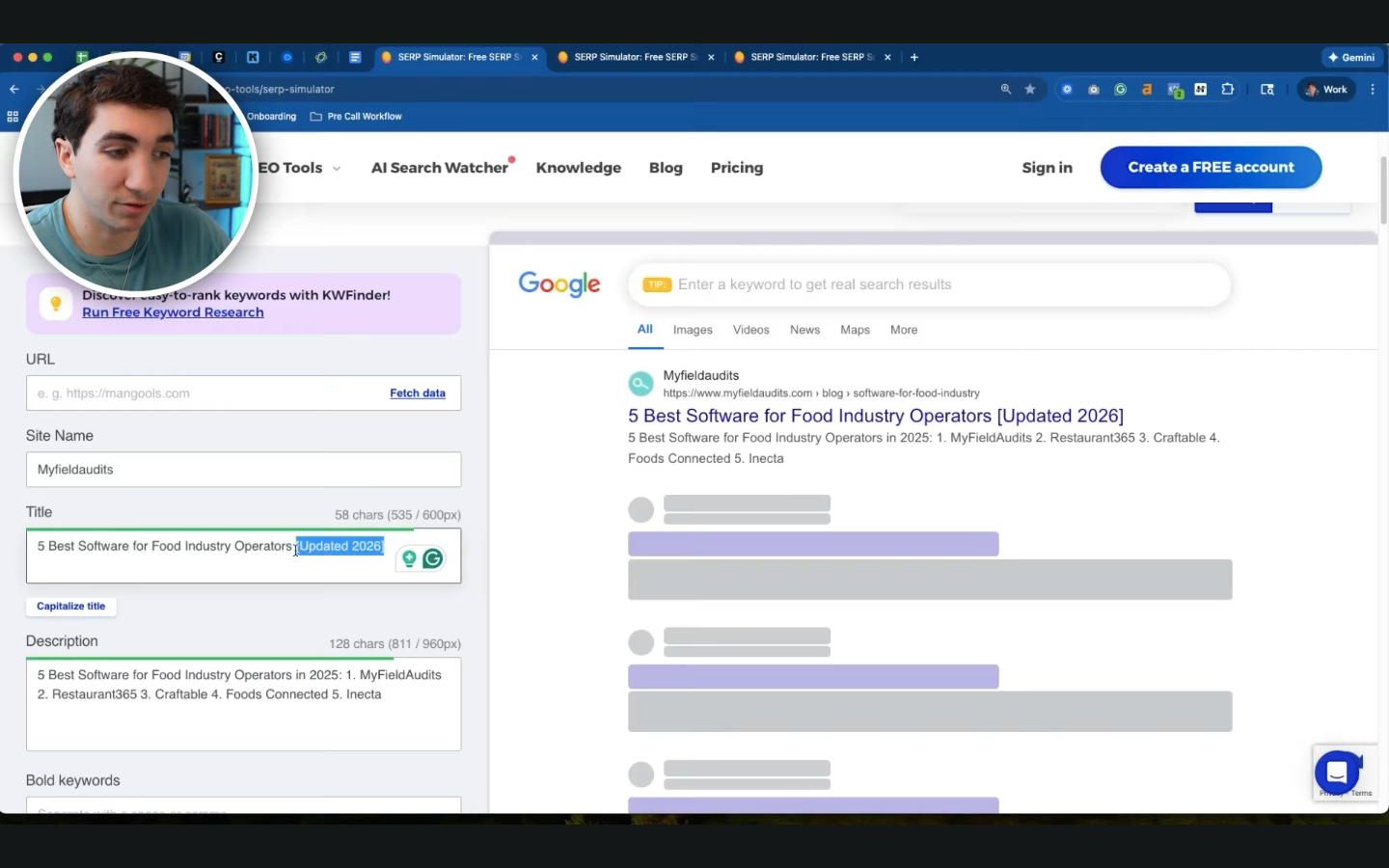
A benefit bracket can help by showing an extra reason to click before someone visits the page. It is a short phrase placed at the end of a title tag, such as:
- [Updated 2026] tells searchers that you reviewed the information recently.
- [Free Checklist] tells them they can use a practical resource.
- [Free Template] tells them a ready-to-use file is available.
Before adding one, review your existing pages for templates, calculators, current-year information, case studies, or checklists that your titles don’t mention. Bringing one of those assets into the title can make the result more descriptive.
Start testing on pages with high impressions and a low click-through rate in Google Search Console. Don’t choose pages from search volume alone, since a smaller comparison query may attract people who are closer to buying.
Keep each promise accurate, and don’t add extra wording just to improve an SEO score in a plugin.
2. Turn Your Meta Description Into a Mini Offer
Once a title catches someone’s attention, the meta description can give them another reason to visit. Software buyers usually search because they need an answer, tool, comparison, or solution, so a description that only repeats your page title wastes valuable space.
A useful mini-offer connects three pieces of information in one short message:
- Problem: Mention the issue that led someone to search.
- Outcome: Explain what they can accomplish after visiting the page
- CTA: Tell them what to do next, such as using a calculator, downloading a template, or comparing software
For example, someone searching for an MRR calculator wants help calculating monthly recurring revenue. Your description could explain that they can enter their figures into a calculator and get the result rather than talking broadly about your SaaS platform.
A good meta description stays close to the search intent and makes concrete promises. When you add meta descriptions to comparison pages, templates, calculators, or guides, make sure every resource you mention actually appears on the page.
Misleading copy may earn a click, yet it can disappoint potential customers as soon as they arrive.
Google can rewrite snippets for individual searches, and keywords in meta descriptions aren’t a direct ranking factor. Treat the description as useful sales copy for the person choosing between results.
3. Put Your Main Keyword in the First 50 to 100 Words
SaaS blog introductions often spend too much time explaining broad industry problems before reaching the subject someone searched for. A reader looking for behavioral analytics software doesn’t need several paragraphs about why data is important before learning which tools the article covers.
After your keyword research identifies the primary query, mention it naturally within roughly the first 50 to 100 words when the phrase fits the opening. Give the term useful context at the same time, such as the problem those tools solve or the type of answer the article provides.
For an article targeting “behavioral analytics tools,” you could explain early that these products help SaaS teams see how users interact with a product and identify where people leave an onboarding flow. Such an opening confirms the topic without forcing the phrase into an unrelated sentence.
Aside from that, give your content writers enough direction to establish four points in the introduction:
- Topic: Explain exactly what the page covers.
- Audience: Identify who the information is written for.
- Problem: Connect the topic to the reason the reader searched.
- Expected answer: Explain what the reader will learn or receive.
Once you’ve established the main phrase, use natural variations throughout the rest of the page, but avoid keyword stuffing.
4. Optimize Your H1 Around One Primary Keyword
Each page should have one H1, and that heading should contain the main keyword naturally.
Your H1 should tell someone exactly what the page focuses on before they start reading. SaaS teams sometimes weaken that focus by combining two different search intents because they hope one article will rank for a larger group of queries.
Consider an H1 such as "5 Best Behavioral Tools for Success and How to Improve Retention." Someone looking for behavioral tools probably wants software options to compare, whereas a search about improving retention calls for strategies and practical steps.
Combining those needs leaves the page trying to serve two different purposes.
A clearer version would be "5 Best Behavioral Analytics Tools for User Retention." It keeps the software comparison as the main topic and uses retention to explain the benefit without turning the article into a second guide.
Choose specific keywords based on the language your audience uses in searches. Your H1 and page title can differ slightly, yet both should describe the same main subject.
Competitor research can uncover additional keyword ideas, but every promising term doesn’t belong in the same headline. When a query represents a separate intent, give it its own page instead of making the current H1 harder to understand.
5. Add a Search Intent Block to Your Introduction
A search intent block is a focused one- or two-sentence opening that tells readers the page provides the kind of answer they expected when they clicked.
Start by identifying what the query suggests the person wants:
- Software listicle: Someone searching for “best CRM tools” wants several products they can compare.
- Alternatives article: A query such as “HubSpot alternatives” suggests the reader wants replacement options and reasons to consider each one.
- How-to guide: Someone searching “how to track churn” expects practical steps they can follow.
- Template page: A search for a marketing budget template suggests the person wants a usable file rather than a long explanation before the download.
- Pricing page: Someone searching for Salesforce pricing wants costs, plan differences, and possible fees without being pushed straight toward a demo.
An informative article should make its answer just as clear. More detailed long-tail keywords can help because they reveal needs such as company size, use case, or software category.
Natural questions related to the same intent can later support voice search queries in an FAQ. Keep those additions closely connected to the original search rather than adding questions simply to cover more phrases.
6. Add Internal Link Boosters From High Traffic Pages
One useful SEO hack for a SaaS website is adding internal links from established pages to newer or commercially important URLs. Internal links connect pages on your own site, and they help readers and crawlers understand how those pages relate to each other.
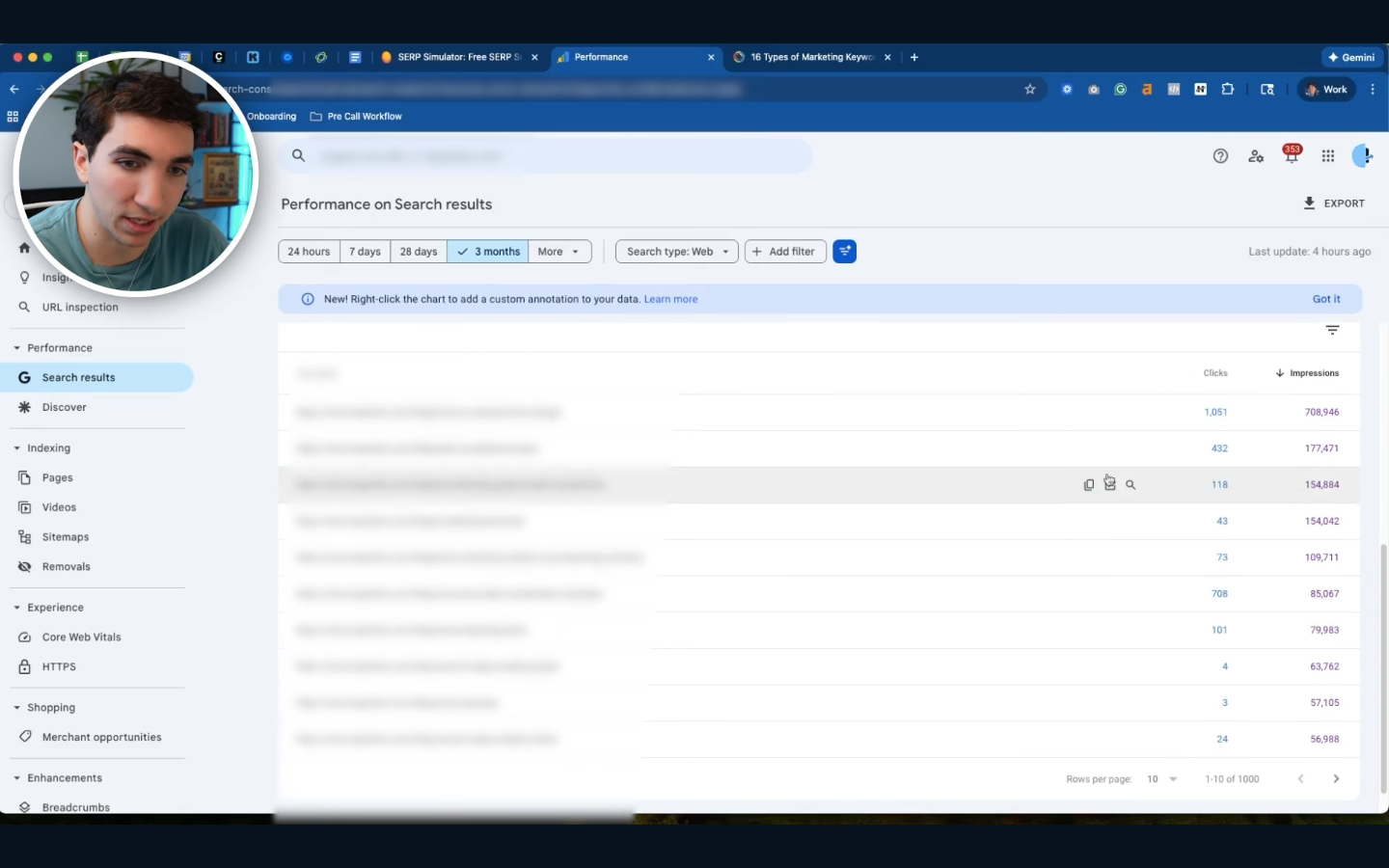
You don’t need to guess which pages should provide those links. Open Google Search Console and use your performance data:
- Go to "Performance" and open the "Pages" report.
- Sort URLs by clicks or impressions from highest to lowest.
- Find established pages that receive steady search traffic.
- Review those pages for sections that naturally relate to a product, feature, comparison, or use-case page.
A relevant internal link can pass some ranking power from an established URL to another page, though one link won’t automatically improve its position.
Connect related articles rather than adding links wherever traffic happens to be high. Clear topic clusters create the logical structure that search engines love because crawlers can follow links between closely related resources and understand how your content fits together.
7. Upgrade Your Internal Link Anchor Text
Anchor text is the visible, clickable wording of a hyperlink. Readers use those words to understand where a link will take them, and crawlers can use the same context to learn more about the destination page.
Compare “click here to learn more” with “predictive marketing analytics.” The second version tells someone what they’ll find before clicking and gives crawlers clearer information about the linked page, which can support its ability to rank higher for relevant queries.
Review important destination URLs in your preferred SEO tools, then choose anchors that accurately describe each page. Keep the wording concise enough to scan, yet don’t force every link into an arbitrary two-to-five-word limit. Natural phrasing is more important than hitting a specific length.
You can also audit older articles for vague anchors such as:
- Click here
- Read more
- Learn more
- This article
- This page
Replace them where a descriptive phrase fits naturally. Check for broken links during the same audit because dead URLs interrupt readers and send crawlers toward pages that no longer work.
8. Add a Related Posts Section to Blog Pages
When a software buyer finishes an article, they may still need help with the next part of the topic. A related posts section gives them relevant resources to continue reading rather than making them search your site manually or leave to find the answer somewhere else.
For example, a keyword research guide could recommend an article about buyer-intent keywords. A SaaS SEO guide could point readers toward a technical SEO checklist. Connecting closely related blog posts gives readers a logical next step and creates more internal paths for crawlers to follow.
Place related content at the end of an article or after a section where another resource would genuinely help. Avoid automatically showing random posts simply because they were published recently.
Useful recommendations can help you get more value from existing website traffic by directing interested visitors toward another relevant page.
Keep this separate from external link building, where the aim is to earn links from other websites through assets such as original research, useful tools, or data reports.
9. Turn People Also Ask Questions Into Useful FAQs
Google’s People Also Ask section can reveal follow-up questions people have about the topic you’re covering.
Choose questions that directly support the page’s main intent. A short question may fit naturally in an FAQ, whereas a topic that needs several paragraphs of explanation may deserve its own H2 or H3 section.
Write the response in your own content; give readers the direct answer first, then explain the reason, process, limitation, or example they need to understand it. Use reliable primary sources when an answer includes statistics, product details, or other claims that require evidence.
Don’t add every question you find simply to make the article longer. People Also Ask results, customer reviews, and user-generated content can reveal recurring questions. Only include questions that support the page’s main intent.
10. Add Comparison Tables to Listicles and Guides
A comparison table helps readers evaluate several software options without reading every product section first. Rows and columns make differences in pricing, use cases, features, trials, and limitations easier to compare, which is especially useful when someone has already narrowed their search to a few products.
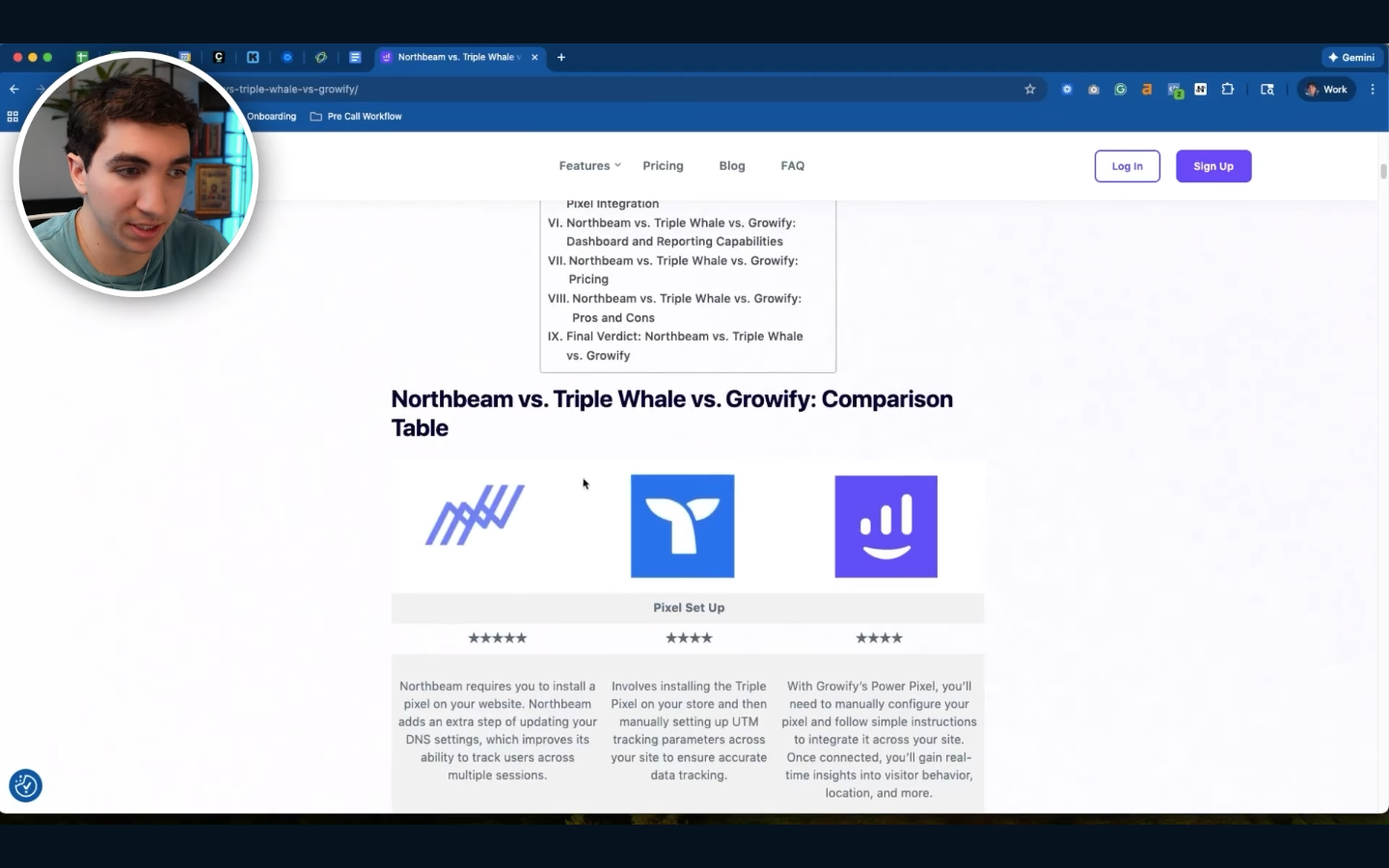
Place the table near the beginning of the comparison section and choose columns that help with the buying decision. Useful options include:
- Software: Product name.
- Best for: Main audience or use case.
- Starting price: Current entry-level cost.
- Free trial: Availability and duration.
- Main feature: Standout capability.
- Key limitation: Important drawback.
Verify prices and features against official sources before publishing because SaaS plans can change. Keep the information consistent with the detailed reviews below the table.
A useful comparison can support more traffic and your website's visibility by making the page more useful. Make the layout mobile-friendly too, using horizontal scrolling or another responsive format when several columns won’t fit comfortably on smaller screens.
11. Add High-Quality Outbound Links to Support Your Claims
SaaS buyers often want proof when an article mentions a statistic, technical rule, or industry trend. High-quality outbound links give them a way to check the source.
Whenever possible, cite the original source. Google Search Central and Bing documentation work well for search guidance. Google News can help you find current reporting, while official product documentation, original studies, and government data can support factual claims.
Linking to other sites only helps readers when the source genuinely supports the sentence beside it.
Place each citation close to the claim and check the source yourself before publishing. Don’t copy a statistic from another article without confirming what the original research actually says.
Reliable citations can support long-term SEO success by making your research easier to verify, though linking to a well-known website doesn’t raise your domain authority simply because you cited it. Authority links provide evidence for readers rather than transferring the source’s reputation to your site.
12. Update Time-Sensitive Content and Titles for 2026
Software changes quickly, so an article published last year may now contain old prices, removed features, outdated screenshots, or products that no longer deserve a recommendation. Updating the year in the title only makes sense when you update the information behind it too.
Focus first on pages where recency affects the reader’s decision, such as:
- Best software lists
- Competitor reviews and alternatives
- Pricing guides
- Annual reports and statistics
- SEO and marketing trend articles
During each refresh, check product selections, prices, features, limitations, screenshots, statistics, internal links, external sources, title tags, and descriptions. Replace old information with fresh content that reflects what readers can expect now.
Recent product launches, pricing changes, and new software trends can give you useful content ideas for improving an existing guide beyond changing its date.
13. Check for Accidental Noindex Tags
A noindex directive tells compliant search engines not to include a page in their index. Finding one on an important product, comparison, integration, or article page can explain why your search engine optimization work hasn’t produced visibility for that URL.
Accidental noindex settings often appear after staging work, website migrations, template changes, or CMS and plugin updates. Start with pages that should appear in search, then inspect their SEO settings or source code for a robots directive containing noindex.
CMS-wide settings deserve attention too. WordPress, Webflow, Framer, and similar platforms can apply indexing rules beyond a single URL. Check that important production pages remain available to search engine spiders and that staging rules didn’t carry over when the site went live.
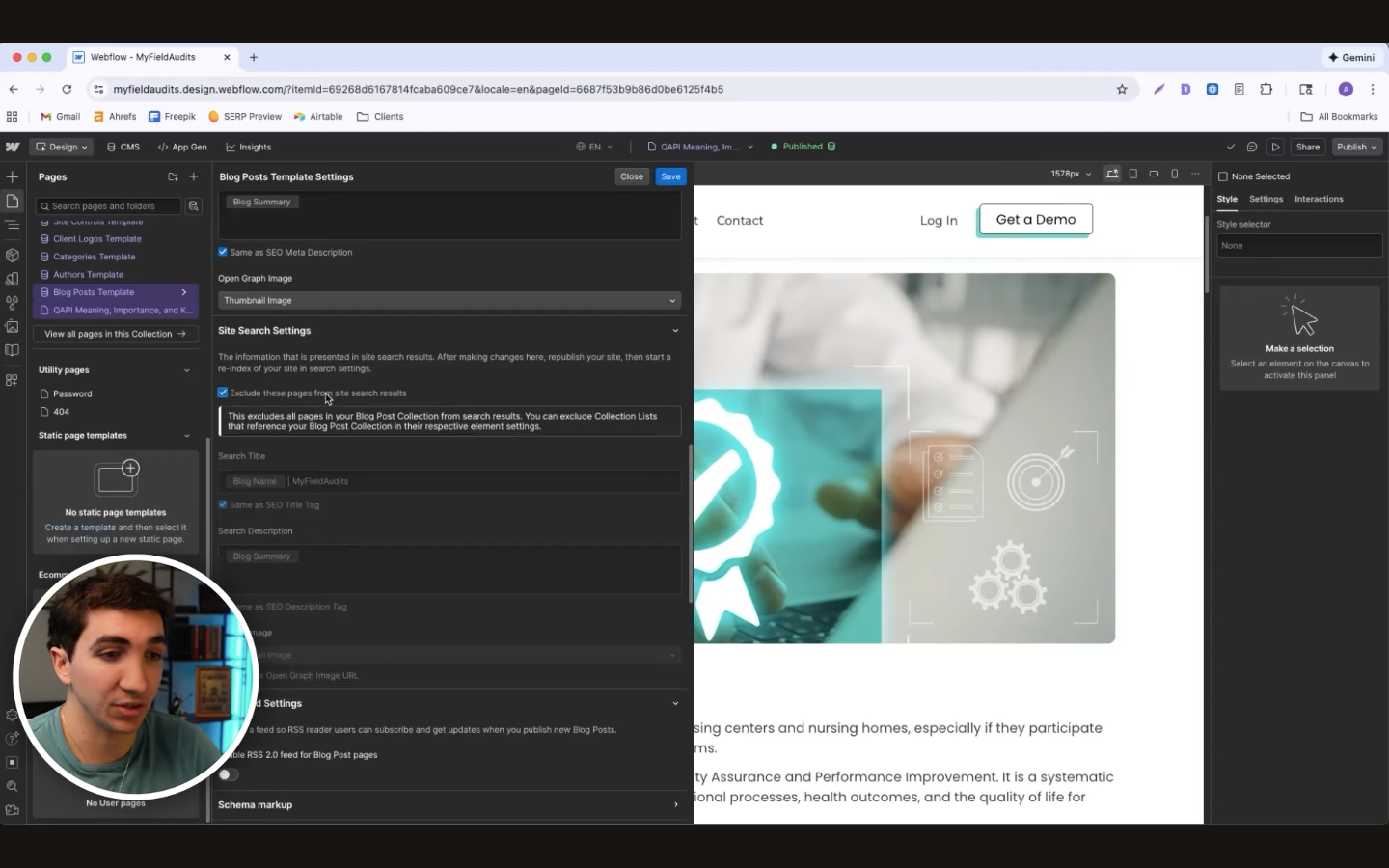
Several free SEO tools can inspect robots directives and indexability, and Google Search Console can help you check how Google sees individual URLs.
14. Make Sure Your Canonical Tags Point to the Right URLs
A canonical tag identifies the preferred URL when search engines encounter duplicate or very similar versions of a page. SaaS sites can create these variants through tracking parameters, duplicated templates, migrations, and CMS settings, so canonicals deserve regular checks.
For example, a campaign link may add "?utm_source=newsletter" without changing the actual page content. A canonical can point search engines toward the clean version and keep tracking parameters from complicating your preferred URL structure.
Similar duplicates appear on most sites that use campaign tracking or other URL parameters.
Problems start when a canonical points somewhere unexpected. A copied feature-page template might still reference the original page, an HTTPS URL might point to an HTTP version, or a template error could send several articles toward the same destination.
Include canonical checks in technical audits of your own website, especially after migrations and template updates.
15. Add Schema Markup to Relevant Pages
Schema markup gives search engines structured, machine-readable information about a page's content. Instead of leaving every detail in ordinary text, structured data can identify information such as an article headline, software application, organization, or breadcrumb path.
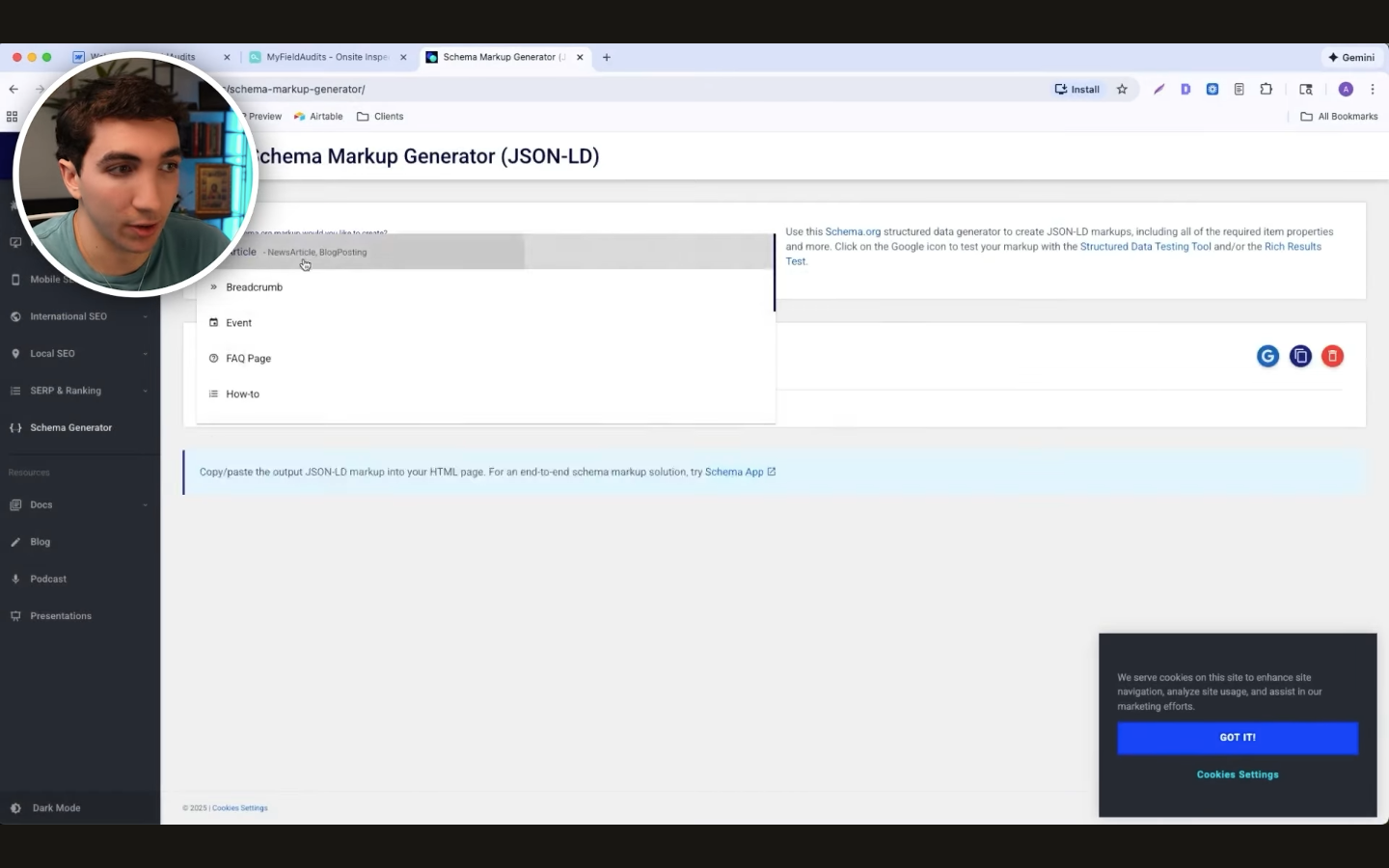
Choose markup that matches what visitors can actually see. Common options for SaaS websites include:
- Article: For articles and guides with author and publication details.
- SoftwareApplication: For suitable software pages with supported application details.
- BreadcrumbList: For pages that show a clear hierarchy.
- Organization: For information about the company and brand.
Many CMS plugins can generate structured data, or developers can add JSON-LD through templates and dynamic fields. Keep every property consistent with visible quality content, especially prices, ratings, and reviews.
Validate eligible markup with Google’s Rich Results Test after publishing or changing templates. Schema can help search systems interpret information and may make some pages eligible for supported search features.
16. Add a Table of Contents With Jump Links
Long SaaS guides can run for thousands of words, and readers rarely need every section at the same time. A table of contents gives them a clear list of major topics, while jump links take them directly to the section they want.
When creating content such as software listicles or buyer guides, build your heading structure before drafting and use the main sections for your table of contents. Useful links may include Best Tools, Comparison Table, Pricing, Key Features, Selection Criteria, and FAQs.
Keep the labels consistent with the headings they lead to, and avoid filling the menu with every small subsection. Long-form pages may attract more organic traffic when they answer broad search needs, but the table itself mainly helps readers find those answers quickly.
A table of contents cannot compensate for weak writing either. Put your effort into original research and high-quality content, then use jump links to make that detailed information easier to reach.
17. Write Descriptive Alt Text for Your Images
Alt text describes the useful information or purpose of an image for people who cannot see it. Screen readers can read that description aloud, which becomes especially helpful for visually impaired visitors browsing SaaS pages on mobile devices.
Write the description around what someone needs to understand from the visual. For a dashboard screenshot, “marketing analytics dashboard showing monthly recurring revenue growth” provides more context than “dashboard screenshot.”
Alt attributes aren’t meta tags, even though both provide information in HTML that search systems can process. Alt text primarily supports accessibility and can give search engines useful context about an image.
Avoid stuffing keywords into descriptions or adding text to purely decorative graphics. Decorative images can use an empty alt attribute when appropriate.
Image accessibility is separate from Google's mobile-first index, which uses the mobile version of a site for indexing. Check screenshots, tables, and other visual elements on smaller screens to make sure important information remains usable.
18. Embed Relevant Videos in Your Blog Content
Some SaaS topics become easier to understand when readers can watch the process. Product demonstrations, tutorials, feature walkthroughs, webinars, and process explanations can provide useful video content when the format genuinely helps explain the subject.
Place each video near the section it supports and introduce what viewers will learn before the embed. An article about tracking churn, for example, could include a walkthrough showing where to find churn data and how to interpret the numbers rather than inserting a generic company promotion.
Readers should be able to choose between watching and reading without losing the main answer. Keep enough written context on the page for someone who skips the video.
Loading performance needs attention because large media files can hurt site speed. External video hosting and lazy loading can reduce the initial page load, and you can improve site speed further by compressing large screenshots or dashboard images used around the embed.
19. Add Breadcrumbs to Important SaaS Pages
Breadcrumbs show where the current page sits within a larger website structure, usually through a path such as "Home > Blog > SEO > Current Article." Someone who lands on a deep product, integration, or resource page can use those links to move back to a broader category.
SaaS companies can use breadcrumbs for resource libraries, product hierarchies, feature collections, and integration directories. Keep parent categories clickable and use names that match your actual site structure.
Breadcrumbs create useful internal connections that can help search systems understand page relationships. Better paths may help visitors explore related resources and support organic traffic indirectly by making a large site easier to use.
20. Add Open Graph Tags to Your Important Pages
When someone shares a SaaS page through social media, Open Graph tags can tell supported platforms which title, description, and image to use for the link preview. Without those settings, a platform may choose page information or an image that doesn’t represent the resource well.
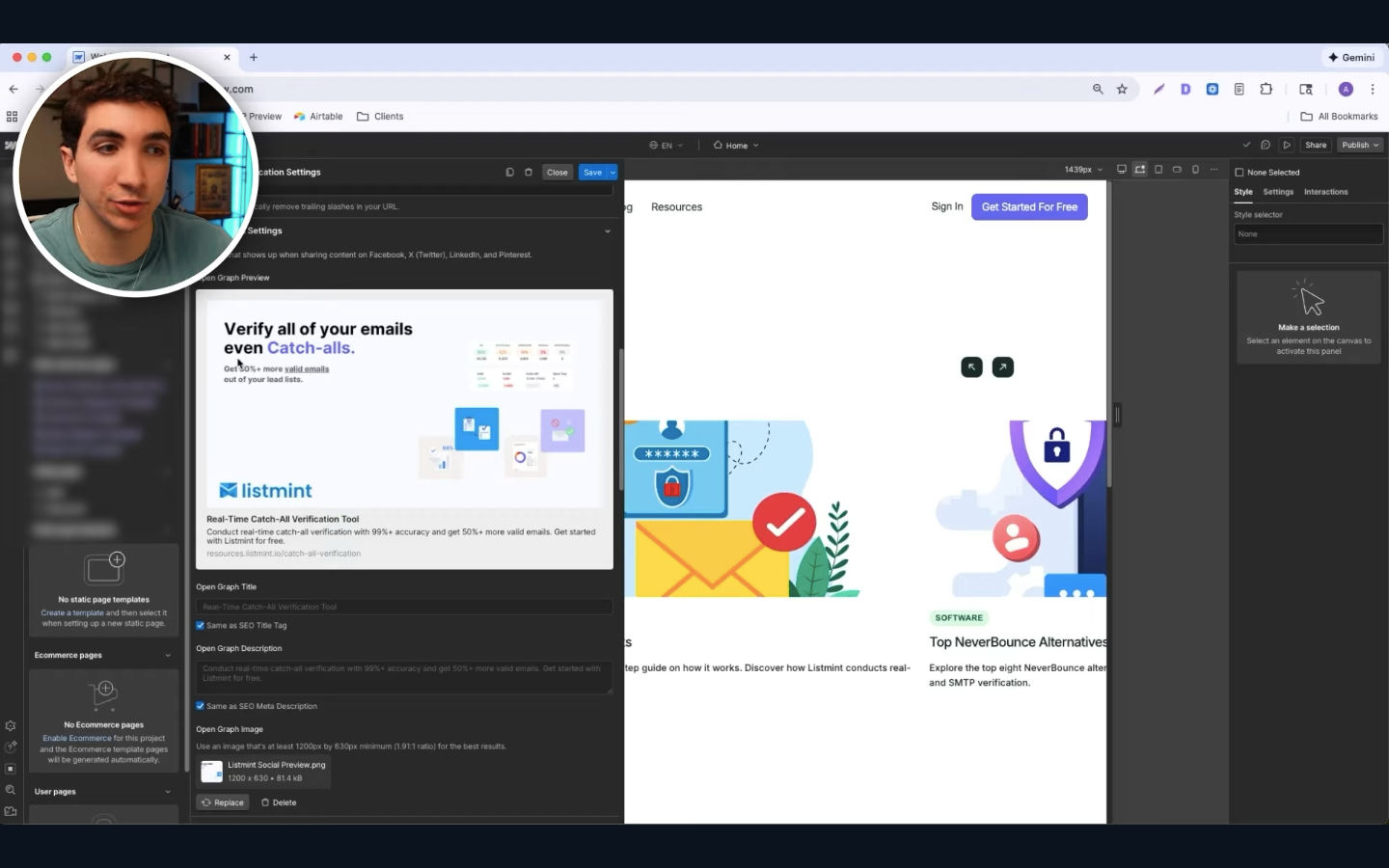
Three common properties deserve attention:
- og:title: Provides the headline shown in the preview.
- og:description: Summarizes why someone may want to open the page.
- og:image: Supplies the visual used for the shared card.
Create preview images that represent the specific resource and remain readable at smaller sizes. Research reports, templates, major guides, tools, and product pages deserve particular attention because people may share them with colleagues through social media networks.
Open Graph metadata doesn’t directly improve Google rankings. A useful preview simply presents your link more clearly when it gets shared and can give someone a stronger reason to visit your resource.
21. Submit Your XML Sitemap to Google and Bing
An XML sitemap gives search engines a structured list of the important web pages you want them to find. Most modern CMS platforms and SEO plugins can generate the file automatically, though custom SaaS stacks may require developers to configure one.
Once you locate the sitemap, submit it through the Sitemaps section in Google Search Console and Bing Webmaster Tools. Many site owners do this after launching a site, changing domains, completing a migration, or making major structural updates because it gives search engines a direct source for discovering eligible URLs.
Keep the sitemap limited to canonical pages intended for search. Exclude broken URLs, duplicate parameter versions, staging pages, and URLs that intentionally use noindex when your setup allows it.
Submitting to Bing can help your pages get discovered through Bing and services that rely on its index, which gives your site another route to other search engines and search experiences.
Which of These 21 SEO Hacks Should You Implement First?
Start with technical visibility because your other SEO efforts have little chance to help when important pages cannot be indexed.
Check product pages, feature URLs, and key articles for accidental noindex directives, confirm their canonicals point to the preferred versions, then submit a clean XML sitemap to Google Search Console and Bing Webmaster Tools.
Sitemap submission can help popular search engines find eligible URLs, though it doesn’t guarantee indexing.
Next, improve pages already earning impressions. Better titles, accurate meta descriptions, and genuine content updates can help bring more visitors without requiring a new article. For future pages, use a keyword research tool to identify buyer searches before choosing the primary topic and search intent.
Once those foundations work, strengthen internal links and add comparison tables, FAQs, videos, schema, and Open Graph tags where useful. Relevant guest blogging opportunities can support external promotion later.
If your SaaS product serves businesses with physical locations, local SEO may still matter to your customers. However, Google Maps and location-page optimization require a separate strategy from the 21 page-level updates covered here.
Let ABHMedia Implement These SEO Tips for Your SaaS
Applying these 21 SEO tips takes ongoing work because technical fixes, content, internal links, and backlinks need to support the same search strategy. At ABHMedia, we handle that work for B2B SaaS companies that want search to bring in demos, trial sign-ups, qualified leads, and paid users.
We start with a strategy session where we learn about your SaaS product, ideal customer profile, current SEO, and growth targets.
From there, we create your SEO strategy, run a technical audit, plan content around buyer-intent keywords, and start the content and link-building work needed to support your important pages.
We Handle Your SaaS SEO From Strategy to Execution
You don't need to hire separate people to manage each part of the SEO process. Our team handles technical SEO, keyword strategy, content creation, existing-page updates, link building, conversion tracking, and reporting as one done-for-you service.
Many of the tasks covered in this guide become part of that work. We can find indexing and canonical problems during technical audits, improve pages that don't match search intent, update older articles, strengthen internal links, and support important commercial pages with targeted backlinks.
For larger SaaS sites, our work can include primary page creation, programmatic SEO, UI/UX development, mass-scale content clustering, and conversion rate optimization. We choose the work based on your current site and opportunities.
We Target Searches That Can Bring You Customers
Getting more traffic isn't useful when the people landing on your site have little reason to buy your software. We focus on keywords that match your ideal customer and show commercial or transactional intent, then create pages that answer those searches in the format people expect.
That can include:
- Comparison pages for buyers evaluating competing products
- Alternative pages for people considering a switch
- Feature pages for specific product needs
- Use-case content for particular roles or problems
For our link-building, our average client receives 5 to 30 backlinks per month, with the focus placed on relevant, high-quality placements rather than hitting a large backlink count.
Choose the ABHMedia SEO Plan That Fits Your Current Stage
Our SEO Setup gives SaaS companies a starting system with 12 core blog articles, four done-for-you backlinks, a three-month content roadmap and keyword calendar, a SaaS content writing guide, and a technical SEO audit with fixes.
Our Starter SEO plan is built for companies below 10,000 monthly organic visitors and includes ongoing content, backlinks, page rewrites, technical SEO, keyword strategy, conversion tracking, programmatic SEO consulting, and monthly reporting.
For SaaS companies between 10,000 and 30,000 monthly organic visitors, Mid-Size SEO adds primary page creation, UI/UX development, and programmatic SEO implementation. Companies above 30,000 monthly organic visitors can use Enterprise SEO, which adds mass-scale content clustering and conversion rate optimization.
No matter which service fits your company, you own the assets we create and keep full access to them.
FAQs About SEO Hacks
What are SEO tricks?
SEO tricks are practical changes that can help search engines understand your pages and help users find useful answers. Examples include improving title tags, fixing indexing problems, adding relevant internal links, matching search intent, and updating old content.
What is the 80/20 rule in SEO?
The 80/20 rule in SEO means a small number of actions may produce a large share of your results. For many SaaS sites, fixing technical problems and improving high-value pages can deserve more attention than making minor changes to every URL.
Is SEO dead now with AI?
No, SEO isn’t dead because people still use Google, Bing, and AI search tools to find information and compare products. AI has changed how some answers appear, which makes accurate, useful, well-structured content even more important.
What are the top 5 SEO strategies?
Five core SEO strategies are buyer-focused keyword research, high-quality content, technical SEO, internal linking, and relevant link building.






.png)